What is VPC Peering?
A networking link that allows you to route traffic between two VPCs using private IPv4 or IPv6 addresses is called a VPC peering connection.
Instances in either VPC can communicate with each other as if they are within the same network.
You can create a VPC peering connection between your own VPCs, or with a VPC in another AWS account.The VPCs can be in different Regions (also known as an inter-Region VPC peering connection).
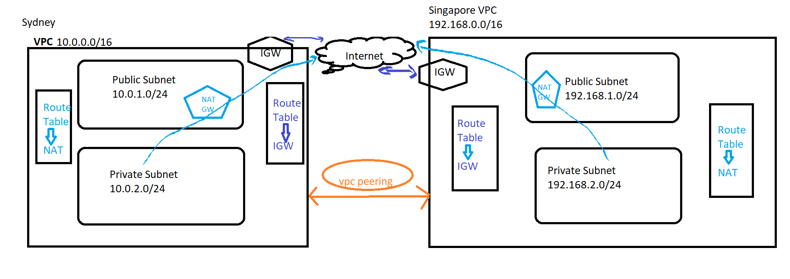
Here are some key points about VPC peering
- Interconnection: VPC peering allows VPC instances to communicate with each other using private IP addresses. This communication takes place over the internal network of the cloud provider, avoiding exposure to the public internet.
- Isolation: Despite the interconnectedness provided by VPC peering, each VPC retains its own network configuration, security settings, and control over resources. This means that VPCs can communicate securely while remaining isolated from each other’s configurations.
- No transitive routing: This is the limitation that catches people out. AWS VPC peering is not transitive. If VPC A is peered with VPC B, and VPC B is peered with VPC C, traffic still cannot flow from A to C. You would need a third, direct peering connection between A and C — or a Transit Gateway. The same rule blocks “edge-to-edge” routing: you cannot reach the internet through a peer’s internet gateway or NAT gateway, and you cannot use a peer’s VPC endpoints.
- Limitations: There might be limitations on VPC peering configurations imposed by the cloud provider, such as restrictions on overlapping IP address ranges or limitations on the number of peering connections allowed per VPC.
- Use Cases: VPC peering is commonly used for scenarios where different applications or services hosted in separate VPCs need to communicate with each other privately. This can include scenarios like microservices architectures, multi-tier applications, or separating development, testing, and production environments.
The cost of a VPC peering connection
Establishing a VPC peering connection is free of cost. When a VPC Peering connection remains inside an Availability Zone (AZ), all data transfer is free. Transfer of data across Availability Zones and Regions via VPC Peering connections is subject to costs.
Want to learn Hands-on on Application load balancer ?
When to use VPC peering — and when not to
Peering is the simplest private link between two VPCs, and for two VPCs it is almost always the right answer: there is no hourly charge for the connection itself, no extra hop, and nothing to manage once it is up. The trouble starts when you have more than a handful of VPCs.
Because peering is point-to-point and non-transitive, connecting every VPC to every other one means a full mesh. That is n × (n−1) ÷ 2 connections: 3 VPCs needs 3, 5 VPCs needs 10, and 10 VPCs needs 45 — each with its own route-table entries on both sides. That is the point where a Transit Gateway stops being optional.
| Option | Best for | Transitive? | Rough cost shape |
|---|---|---|---|
| VPC peering | Two VPCs, or a few that genuinely need to talk | No | No hourly fee; you pay data transfer only |
| Transit Gateway | Many VPCs, hub-and-spoke, shared egress or inspection | Yes | Hourly per attachment, plus data processing |
| PrivateLink | Exposing one service, not joining networks | N/A | Hourly per endpoint, plus data processing |
One more constraint worth knowing before you build: the two CIDR blocks must not overlap. AWS will refuse to create the connection if they do, and there is no NAT-style workaround inside a peering connection. Plan the ranges first.
Before you start
You will need an AWS account (a single account is fine — peering across two accounts works the same way, you just supply the other account ID), and an IAM identity allowed to run at minimum:
ec2:CreateVpc              ec2:CreateSubnet
ec2:CreateInternetGateway  ec2:AttachInternetGateway
ec2:CreateNatGateway       ec2:AllocateAddress
ec2:CreateRouteTable       ec2:CreateRoute
ec2:AssociateRouteTable
ec2:CreateVpcPeeringConnection
ec2:AcceptVpcPeeringConnection
ec2:AuthorizeSecurityGroupIngress
ec2:RunInstances           ec2:Describe*
Here is the addressing plan this walkthrough uses. The exact ranges do not matter — what matters is that they do not overlap, so substitute your own if you prefer.
| Side | Region | VPC CIDR | Public subnet | Private subnet |
|---|---|---|---|---|
| A | Sydney (ap-southeast-2) | 10.10.0.0/16 | 10.10.1.0/24 | 10.10.2.0/24 |
| B | Singapore (ap-southeast-1) | 10.20.0.0/16 | 10.20.1.0/24 | 10.20.2.0/24 |
Because the two sides sit in different Regions, this is an inter-Region peering connection. Everything below works identically for two VPCs in the same Region — the only practical difference is cost, covered at the end.
Let’s check out practically
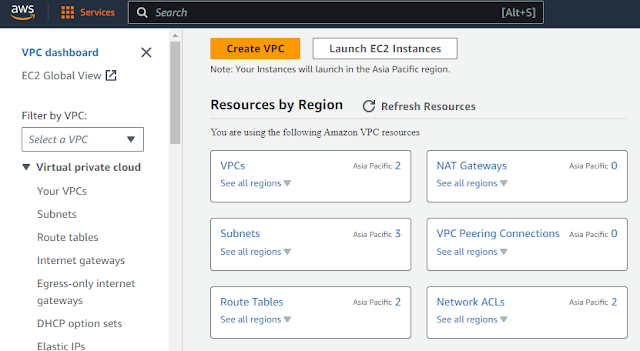
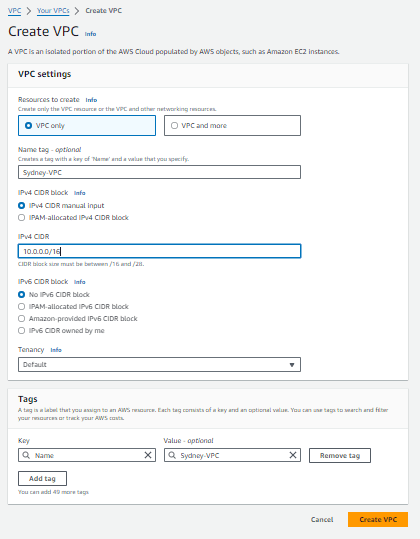
- Step 1: Create two VPCs in your AWS Account
- Creating VPC in Sydney Region
- Step 2: Create Public and Private subnets
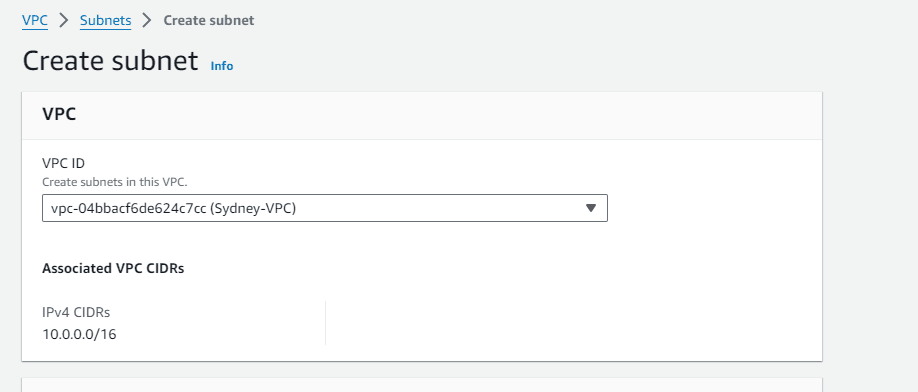
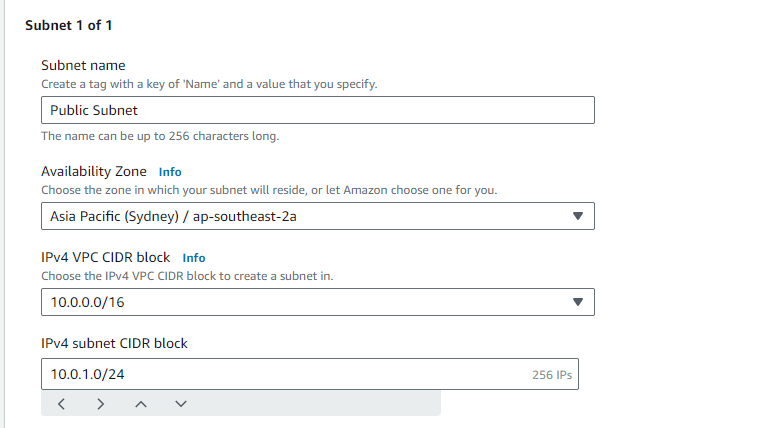
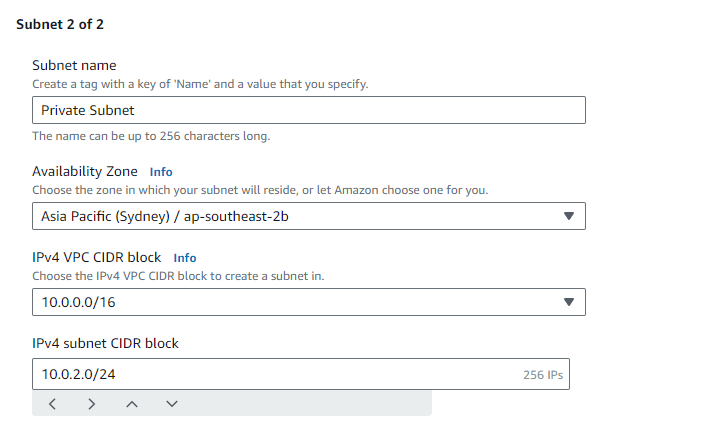
- Step 3: Create Internet Gateway
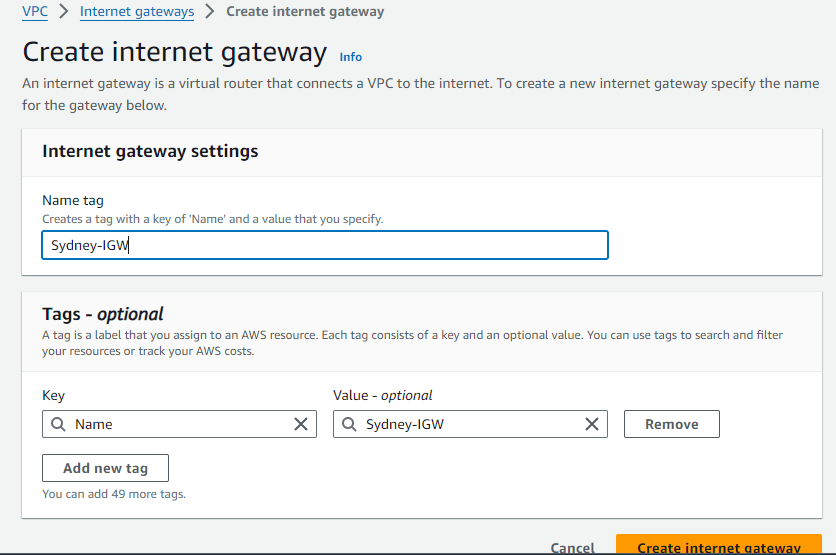
Attach to VPC after creating internet gateway
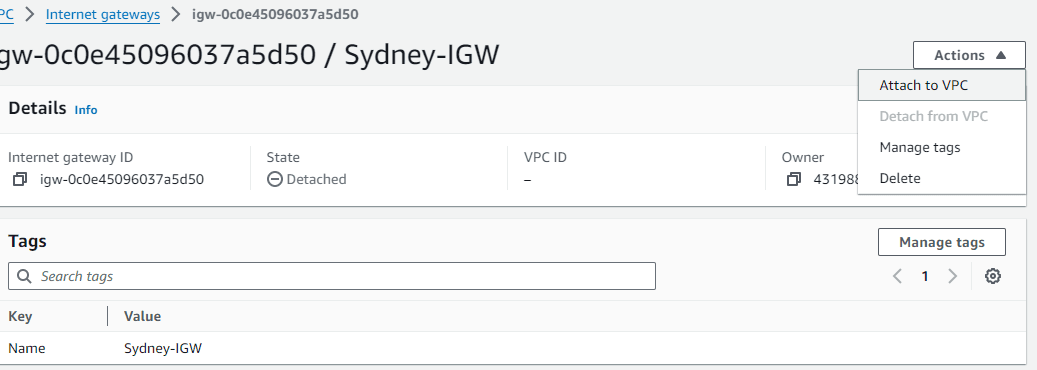
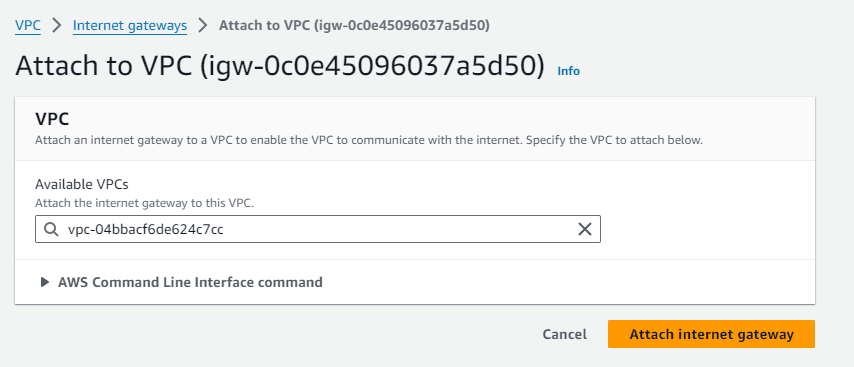
- Step 4: Once Internet gateway is attached to VPC, Create Route Table
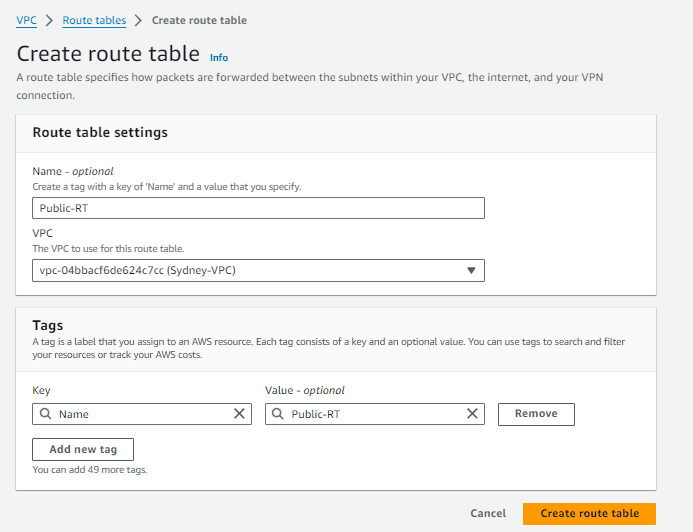
After creating Route Table, edit the subnet associations and add the routes
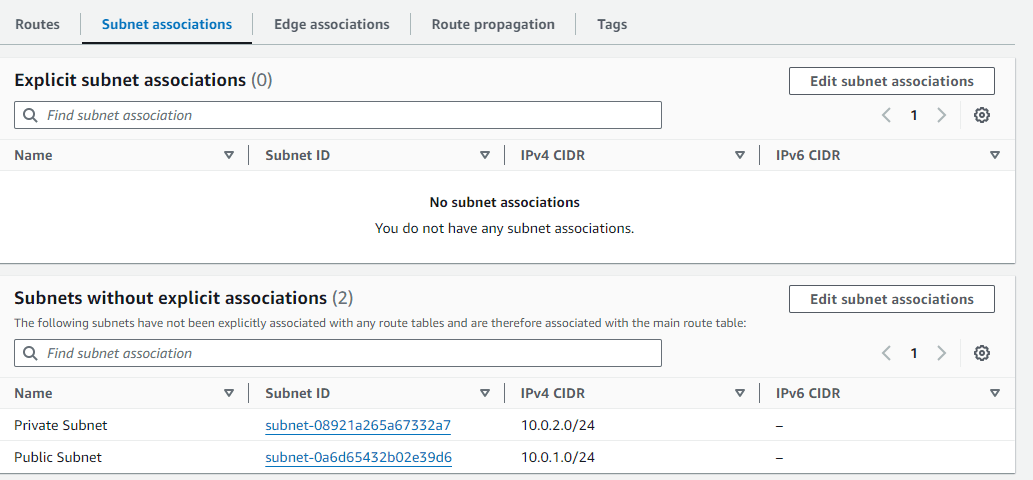
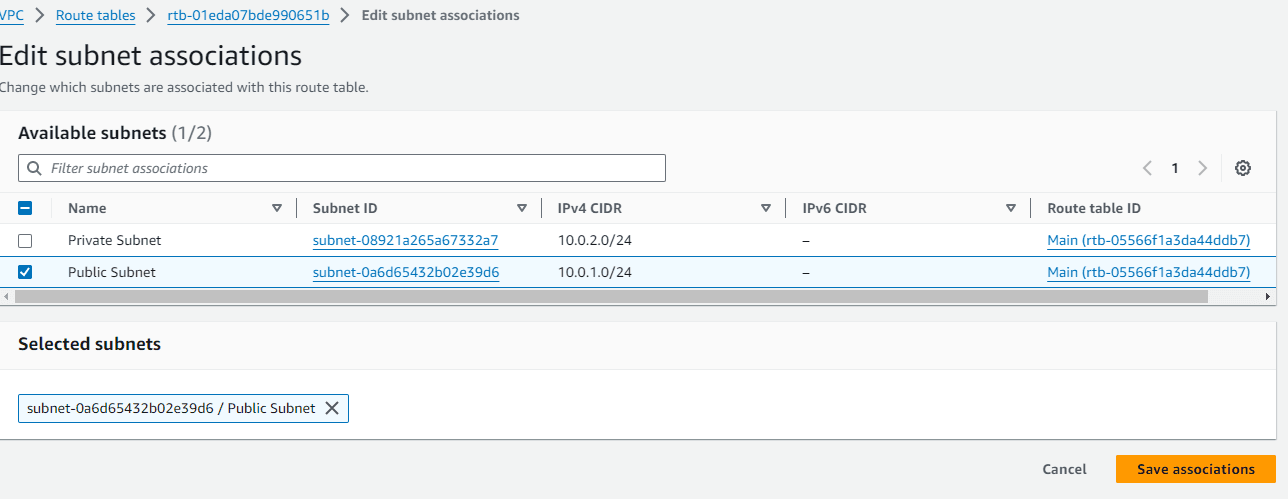
Public subnet is associated and now add the route to IGW
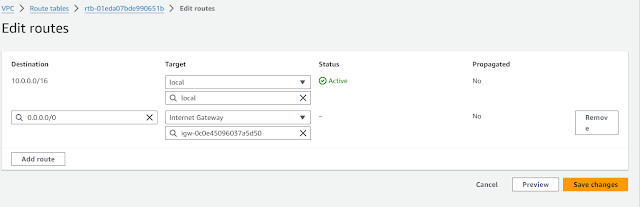
- Step 5: Create NAT Gateway and add private route table
- NAT Gateway must be placed on public subnet and also allocate Elastic IP
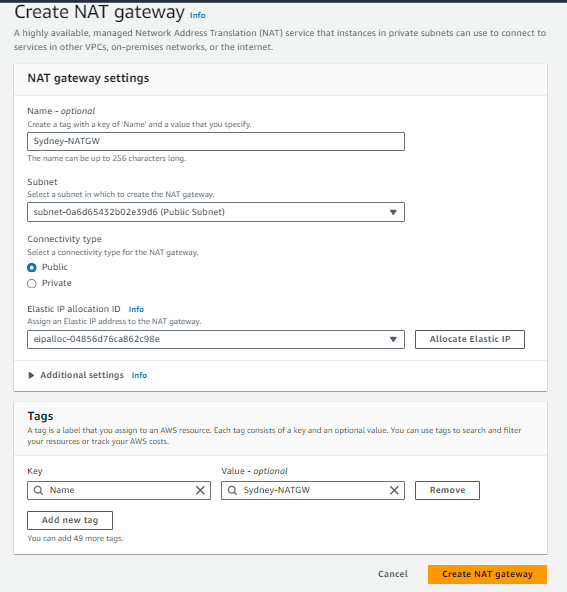
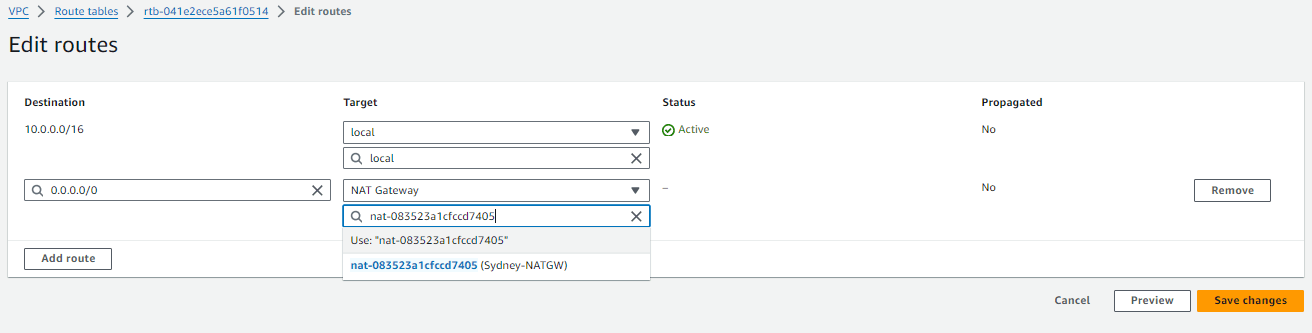
Now create private route table, edit subnet associations and add route to NAT GW
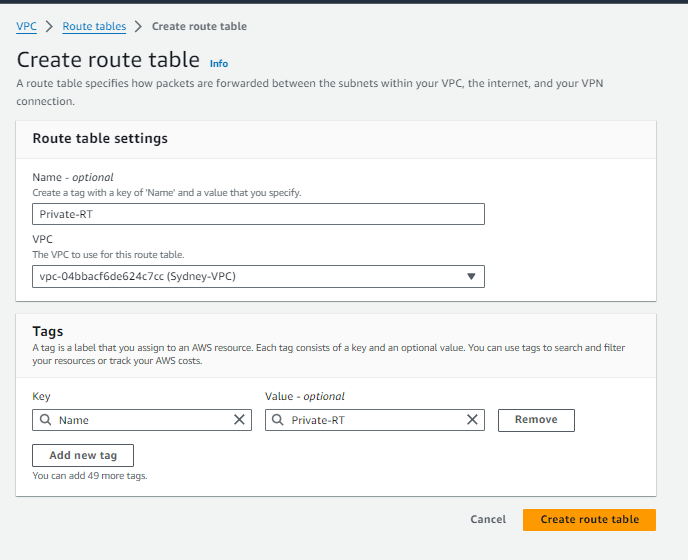
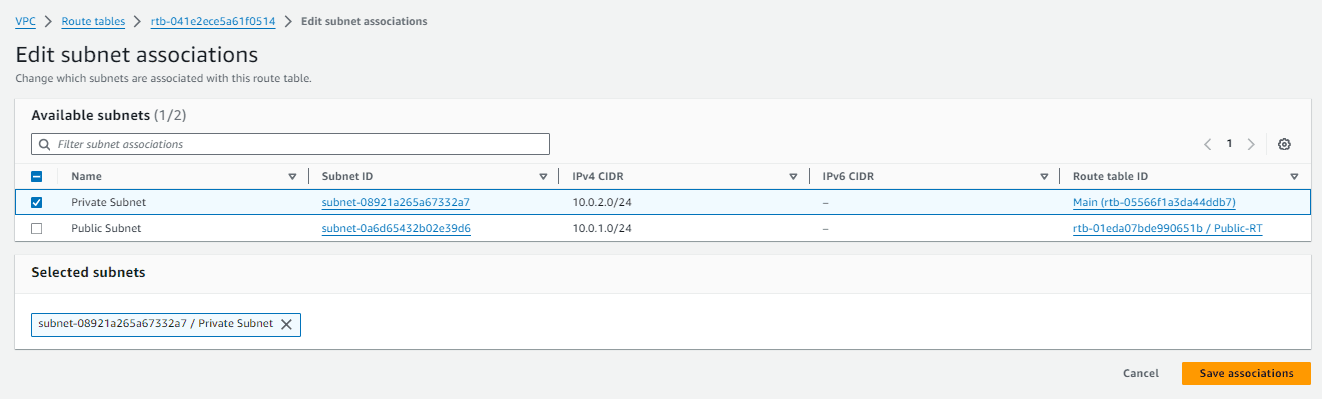
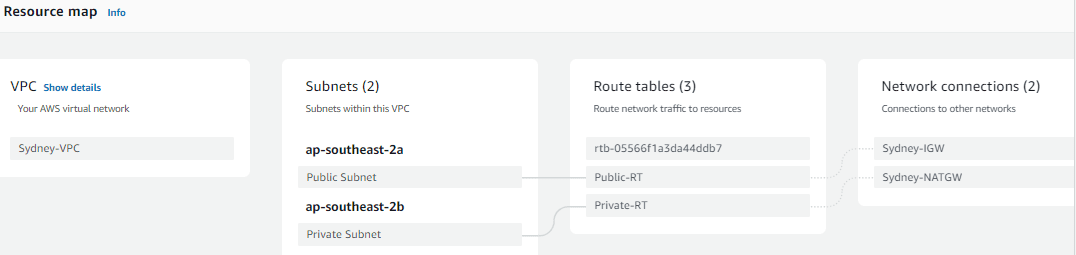
- Resource Map
- Step 6: Launch Public and Private Servers (Using Ec2 )

- Step 7: Similarly as shown above create VPC, IGW, Public Route Table, NAT GW, Private Route table in Singapore region
- Step 8: Also Create Public and Private Servers in Singapore Region( Using Ec2)
- Step 9: Final step is to create VPC Peering Link
- Initiate peering from any one side( Singapore Region), and accept the peering in another side (Sydney Region)
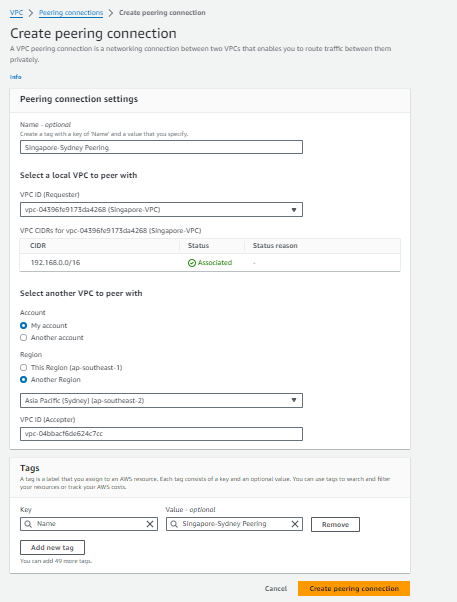

Go to Sydney Region and accept peering request

VPC peering is successfully created and active

Step 10: Add routes for the peering connection
This is the step people miss, and it is why a peering connection can sit at Active while nothing actually talks to anything. Accepting the request creates the link; it does not tell either VPC to use it. Until you add routes, every packet aimed at the other side still follows the default local route and goes nowhere.
You need a route on both sides, in every route table whose subnets should reach the peer. In this build that means four route tables: public and private in Sydney, public and private in Singapore.
In the console: VPC → Route tables → select the table → Routes → Edit routes → Add route. Destination is the other VPC’s CIDR; target is Peering Connection, then pick your pcx- ID.
| Route table | Destination | Target |
|---|---|---|
| Sydney public | 10.20.0.0/16 | pcx-xxxxxxxx |
| Sydney private | 10.20.0.0/16 | pcx-xxxxxxxx |
| Singapore public | 10.10.0.0/16 | pcx-xxxxxxxx |
| Singapore private | 10.10.0.0/16 | pcx-xxxxxxxx |
Or from the CLI, which is faster and easier to repeat:
# Sydney side: send traffic destined for the Singapore VPC over the peering link
aws ec2 create-route
  --region ap-southeast-2
  --route-table-id rtb-SYDNEY-PRIVATE
  --destination-cidr-block 10.20.0.0/16
  --vpc-peering-connection-id pcx-xxxxxxxx

# Singapore side: the mirror image
aws ec2 create-route
  --region ap-southeast-1
  --route-table-id rtb-SINGAPORE-PRIVATE
  --destination-cidr-block 10.10.0.0/16
  --vpc-peering-connection-id pcx-xxxxxxxx
Step 11: Allow the traffic in security groups
Routes get the packet to the instance; the security group decides whether it is let in. Default security groups only allow traffic from members of the same group, so cross-VPC traffic is dropped even with perfect routing.
Add an inbound rule on the destination instance’s security group allowing the source you actually need. Allow the peer CIDR, not 0.0.0.0/0 — you built a private link precisely so you would not have to open it to the internet.
# Allow ICMP so you can prove connectivity with ping
aws ec2 authorize-security-group-ingress
  --region ap-southeast-2
  --group-id sg-SYDNEY-PRIVATE
  --protocol icmp --port -1
  --cidr 10.20.0.0/16

# Allow SSH from the peer VPC only
aws ec2 authorize-security-group-ingress
  --region ap-southeast-2
  --group-id sg-SYDNEY-PRIVATE
  --protocol tcp --port 22
  --cidr 10.20.0.0/16
Network ACLs are stateless and allow everything by default, so unless you have edited them they are not your problem here. If you have tightened them, remember you need an allow rule in both directions.
Step 12: Verify it actually works
SSH into the Sydney public instance, hop to the Sydney private instance, and ping the Singapore private instance by its private IP. Using the private address is the whole point — if it answers, traffic crossed the peering link rather than the internet.
$ ping -c 3 10.20.2.15
PING 10.20.2.15 (10.20.2.15) 56(84) bytes of data.
64 bytes from 10.20.2.15: icmp_seq=1 ttl=253 time=95.4 ms
64 bytes from 10.20.2.15: icmp_seq=2 ttl=253 time=95.2 ms

--- 10.20.2.15 ping statistics ---
3 packets transmitted, 3 received, 0% packet loss
Round-trip time around 90–100 ms is normal between Sydney and Singapore — that is physical distance, not a misconfiguration. Same-Region peering typically lands under a millisecond.
Troubleshooting: active but nothing connects
Almost every failure at this stage is one of five things, in roughly this order of likelihood:
- Missing route on one side. Peering is bidirectional but routes are not. A route in Sydney with none in Singapore gives you a request that arrives and a reply that never returns.
- Route added to the wrong table. Your instance’s subnet may be associated with a different route table than the one you edited. Check the subnet’s Route table tab, not the table you assume it uses.
- Security group blocks it. Especially for ping — ICMP is not allowed by default, so people conclude the network is broken when only the protocol is.
- Testing the wrong address. Pinging the public IP does not traverse the peering link. Use the private address.
- Expecting transitive access. Reaching the internet through the peer’s NAT gateway, or a third VPC through the middle one, will never work. That is by design.
If you want certainty rather than guesswork, run VPC Reachability Analyzer between the two instance IDs. It tells you exactly which hop dropped the packet and which rule was responsible.
What this actually costs
The peering connection is free to create and carries no hourly charge. What you pay for is data transfer, and for this build the peering link is usually not the expensive part:
- Same Region, same Availability Zone — data transfer over peering is free.
- Same Region, across AZs — charged in both directions at the standard cross-AZ rate.
- Across Regions — charged at inter-Region data transfer rates, which vary by Region pair.
- The NAT gateways — these are the real cost in this lab. Each bills an hourly charge plus a per-GB processing fee, and it runs whether or not you use it.
Rates change and differ by Region, so check the current VPC pricing page rather than trusting a number in any blog post, including this one.
Clean up
If you built this to learn, delete it now — two NAT gateways left running are the single most common surprise on a lab bill. Delete in this order, because AWS blocks removal of resources that are still referenced:
- Terminate the EC2 instances in both Regions.
- Delete the peering connection (removing it also drops the associated routes).
- Delete both NAT gateways, then release their Elastic IPs — an unattached Elastic IP still bills.
- Detach and delete the internet gateways.
- Delete the subnets, the custom route tables, then the VPCs.
Worth checking the Elastic IP list explicitly afterwards. It is the one thing that survives almost every teardown and quietly charges for months.
Common questions
Can I peer VPCs in two different AWS accounts?
Yes, and the process is identical — you supply the other account ID when creating the request, and someone with permission in that account accepts it. The accepter must add their own routes; you cannot add routes to a VPC you do not control.
Can I peer VPCs with overlapping CIDR blocks?
No. AWS rejects the connection outright, and there is no NAT inside a peering connection to translate around it. If you are stuck with overlap, the usual answers are PrivateLink for exposing a single service, or re-addressing one side.
Does traffic leave the AWS network?
No. Peering traffic stays on the AWS backbone and never touches the public internet. Inter-Region peering traffic is also encrypted in transit by AWS.
How many peering connections can one VPC have?
The default quota is 50 active connections per VPC and it can be raised on request, but route table entries are the tighter practical limit. Long before you hit either, the management overhead of a full mesh is the real reason to move to a Transit Gateway.
Pingback: Setting up Application Load Balancer in AWS: Hands-On - wordwyzz